
Short answer: the best ChatGPT plugins for marketing depend on the task. Compare Markifact and Adspirer for paid media, GSC Wizard for your search data, Ahrefs and Ubersuggest for SEO research, Canva and Figma for visuals, and HubSpot and Google Drive for CRM context and reporting files. Start with one workflow and verify the output against its source.
Marketing teams don't lack tools. They lack time. Every week you export a report from Google Ads, copy numbers into a sheet, brief a designer, and then explain it all to a client or a boss. ChatGPT can shrink a lot of that work, but only if it can see your data and reach your tools.
That is what plugins do. This guide covers what a ChatGPT plugin is today, which ones are worth a marketer's attention across ads, analytics, SEO and design, and how to connect them without putting your accounts or budgets at risk.
Table of Contents

Review method — 14 November 2026: this is a documentation-based comparison of nine marketing integrations, not a hands-on benchmark or an exhaustive ranking. We reviewed the official product and setup pages linked below for task fit, access requirements, costs and limitations. “Best for” expresses an editorial recommendation for a particular job; it does not promise better campaign results. Availability and pricing can change.
Quick picks: which ChatGPT plugin fits your marketing job?
Use this table to find the right match for your main bottleneck, then read the full section.
| Your main job | Plugin to look at first | What it helps with | Cost and access | Main thing to watch |
|---|---|---|---|---|
| Paid ads reporting and management | Markifact | Google Ads, Meta Ads, TikTok, LinkedIn, GA4 and more in one chat | Trial credits, then paid plans | Write actions exist, so start read-only |
| Multi-platform ad management | Adspirer | Google, Meta, LinkedIn and TikTok campaigns | Free tier of 15 tool calls per month | Free usage runs out fast |
| Your own search data | GSC Wizard | Search Console and GA4 questions in plain language | 7-day trial; Starter €17/month at review | Covers your own properties only |
| Keyword and backlink research | Ahrefs | Keywords, rankings, backlinks, competitors, AI search mentions | Needs an Ahrefs workspace | Third-party estimates, not your own data |
| Quick keyword ideas | Ubersuggest | Volume, difficulty, related keywords, SERP data | Free account access; plan quotas apply | Check current tools and plan quotas |
| Creative production | Canva | Editable social posts, decks, flyers | Works with free Canva accounts | Admin and regional limits can apply |
| Diagrams and flows | Figma | FigJam diagrams and slides from a conversation | Figma account | FigJam/Slides support; regional limits |
| Leads and pipeline | HubSpot | Contacts, companies, deals, tickets | Admin approval depends on your role | Follows each user's HubSpot permissions |
| Briefs and reporting files | Google Drive | Find and use Docs, Sheets and Slides | Google account | Workspace admins may restrict it |
What is a ChatGPT plugin in 2026, and what is it not?
A ChatGPT plugin packages capabilities such as workflow instructions and connected apps. An app provides the connection to a service, such as an ad platform or design tool. Some plugins contain only instructions and do not connect an external account. See OpenAI’s explanation of plugins.
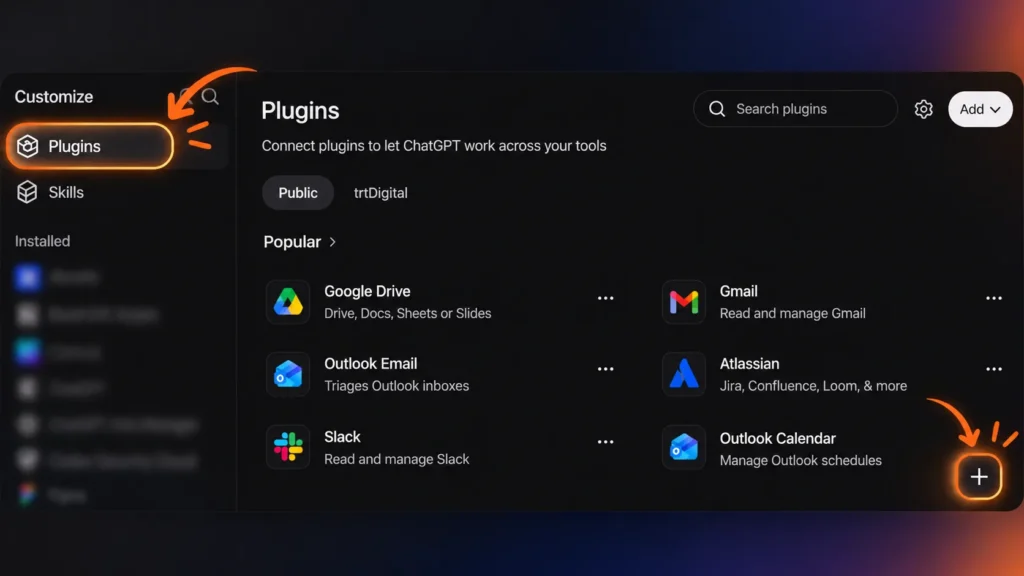
Use the current Plugins directory and the setup options shown in your account. Older tutorials about the original plugin store can describe a different system. Installing a plugin does not automatically authorize access to a third-party account.
Plugins vs apps, custom GPTs and browser extensions
These terms get mixed up constantly. Here is the practical difference:
| Term | What it is | Connects to your accounts? |
|---|---|---|
| App | A connection between ChatGPT and an external tool or data source | Yes |
| Plugin | A package of apps, workflow instructions or both | Usually |
| Custom GPT | A version of ChatGPT with its own instructions | Only with configured tools or actions |
| Browser extension | An add-on installed in Chrome or Firefox | Depends on the extension’s permissions |
People often search for ChatGPT extensions or add-ons when they really want a plugin or app. This guide covers marketing integrations only, not browser tools.
Why older plugin tutorials can lead you to the wrong setup
Check the date of any installation tutorial. Instructions to enable an old beta switch or open the original plugin store may no longer match your account. Follow the current provider setup guide linked in each section.
Best ChatGPT plugins for Google Ads and Meta Ads
Markifact and Adspirer are candidates for teams that want paid-media reporting and supported campaign actions in a conversation. Compare them using the same reporting task and the same accounts. Read permissions carefully: asking for analysis is different from restricting an integration’s ability to make changes.
Test a concrete question: why did cost per conversion rise last week? Confirm the account, dates, currency and conversion definition before acting on an explanation. For specialist support, explore TRT Digital’s Google Ads management service (French).
Markifact: bring paid-media data and reporting together
Markifact’s MCP integration connects marketing platforms to ChatGPT and other compatible assistants. Its documented connections include Google Ads, Meta Ads, TikTok, LinkedIn, GA4, Search Console, HubSpot and Shopify. It supports reporting and actions such as campaign creation and budget updates.
- Best for: media buyers and in-house marketers who report across several channels.
- Cost and access: Markifact advertises trial credits followed by usage-based paid plans. Check its current pricing and estimate credits for your recurring reports.
- Why it helps: you get a breakdown of spend, conversions and trends without exporting a CSV.
- Limitation: it supports actions that can change campaigns and budgets. Check approval settings and test reporting before authorizing changes.
- Skip it if: you run one small campaign and the native dashboard already answers your questions.
Adspirer: another route to multi-platform ad management
Adspirer’s ChatGPT setup guide documents Google Ads, Meta Ads, LinkedIn Ads, TikTok Ads, Amazon Ads and ChatGPT Ads through its direct MCP connection. It also warns that the directory plugin is currently missing newer tools and experiencing issues. Verify the connection method and required platform before building a workflow around it.
- Best for: agencies and teams juggling several ad accounts.
- Cost and access: the free tier gives 15 tool calls per month with no credit card, so regular use needs a paid plan.
- Why it helps: one chat replaces switching between platform interfaces for routine checks.
- Limitation: the directory plugin and direct MCP connection have different tool coverage. Confirm the action you need is supported, use an account with the required permissions, and review changes before they go live.
- Skip it if: you need deep controls that only the native ad managers provide.
ChatGPT plugins for analytics and SEO
Separate first-party performance data from third-party SEO estimates. GSC Wizard helps analyze properties you can access; Ahrefs and Ubersuggest support market research. Check the source behind each result rather than assuming every figure is measured traffic from your own site.
A keyword list is only a starting point. Check crawlability, page intent and content quality as well. TRT Digital’s WordPress SEO plugin comparison (French) covers tools installed on a website, a separate category from these ChatGPT integrations.
GSC Wizard: query your Search Console and GA4 data
The GSC Wizard ChatGPT app analyzes your connected Search Console properties, including query changes, declining pages, click-through rates and possible keyword cannibalization. The product also documents a GA4 MCP integration; confirm that the GA4 connection and tools you need are enabled rather than assuming the Search Console app includes every analytics report.
- Best for: SEO specialists and content teams who want answers from their own data.
- Cost and access: a 7-day trial, then paid plans. Its pricing page lists Starter at €17 per month as reviewed on 14 November 2026.
- Limitation: it needs access to your own properties. Verify which analytics integration is connected and review any non-reporting actions separately.
Ahrefs: keywords, backlinks and competitors
Ahrefs’ MCP documentation describes connecting its API data to ChatGPT for SEO research. Use it to investigate keyword opportunities, competing pages and backlinks. Its product changelog also documents write operations, so check the available actions before assuming the connection only retrieves reports.
- Best for: content strategists, link builders and agencies.
- Cost and access: Ahrefs documents MCP access on Lite and higher plans. Calls consume the subscription’s API units; check the current allowances.
- Limitation: volumes and difficulty scores are estimates, not measurements of your traffic.
Ubersuggest: fast keyword ideas
Ubersuggest’s official ChatGPT guide documents search volume, difficulty, related keywords and search-result data. Its launch guide described further capabilities as a phased rollout. Check the tools exposed by your current connection before relying on domain analysis or auditing; the launch feature list is not a complete current inventory.
- Best for: freelancers and small teams validating blog topics.
- Cost and access: the official guide describes access on any Ubersuggest plan, including free. Data depth and quotas vary by plan.
- Limitation: its numbers are estimates. Use them to compare topics with each other, not as absolute truth.
Useful prompt: “Use the connected SEO tool to research my topic in my target country and language. Show the source and date for each metric. Mark missing values as unavailable and distinguish estimates from my Search Console data.”
ChatGPT plugins for design: from brief to editable creative
Choose Canva for editable campaign designs and consider Figma for collaborative diagrams and presentations. The useful comparison is whether the output fits your team’s editing process. Neither option removes the need to review copy, brand consistency and asset rights before publication.
Canva: turn briefs into editable campaign assets
The Canva plugin can create, edit and preview designs in ChatGPT, then open them in Canva for refinement. Its help page also documents finding, resizing and copying existing designs. Give it a format, audience, approved message and brand direction rather than a vague request for a good-looking ad.
- Best for: social media managers, small businesses and agencies producing a lot of simple creative.
- How to use it well: give ChatGPT your audience, goal, tone and format, and mention your brand kit if you have one.
- Cost and access: Canva Free accounts can connect, but AI allowances and premium actions still apply. Check the current plan requirements for Brand Templates and autofill.
- Limitation: team admins may need to enable the AI connection. Availability and supported features can differ by account; verify the connection before scheduling a client workflow.
- Skip it if: your campaign needs custom illustration or a tightly art-directed look.
Figma: turn conversations into FigJam diagrams and slides
Figma’s current ChatGPT help page supports FigJam diagrams and Figma Slides presentations. For marketing, try a customer-journey flow, campaign timeline or presentation outline, then refine it with your team in Figma. The help page labels the Slides integration as beta.
- Best for: marketers who need campaign flows, customer journeys and timelines the team can refine.
- Limitation: the linked help page currently says the integration is unavailable in the EU and notes beta usage limits for Slides. Check regional access and review generated files before sharing.
Availability in Morocco: regional rules change often. If you work from Morocco or elsewhere in the MENA region, test each connection from your own account before planning a client workflow around it.
CRM and reporting plugins: keep marketing work connected
HubSpot brings CRM context into the conversation; Google Drive supplies briefs and reporting files. A useful workflow connects campaign activity to qualified leads and sales outcomes. TRT Digital’s marketing automation service (French) covers CRM setup, lead nurturing and workflow integration.
HubSpot: put lead sources and pipeline data into context
HubSpot’s connector documentation covers reading CRM context, creating or updating supported records and logging activities. Super Admins and users with App Marketplace Access can connect without prior app approval; other users need a Super Admin to approve access. The connector respects existing user permissions. Review proposed edits and enable approval for write actions.
- Best for: B2B marketers and sales-marketing alignment.
- Limitation: CRM data is sensitive. Limit what the connection can see and do, and follow your company's data policy.
Google Drive: work across briefs, Sheets and presentations
The Google Drive app can find and use files the connected account can access. Supported Docs, Sheets and Slides actions depend on Google permissions and workspace controls. For reporting, identify the exact spreadsheet, reporting period and metric definitions; confirm the app retrieved the file’s contents before trusting its summary.
- Best for: agencies and teams that live in Docs, Sheets and Slides.
- Limitation: ChatGPT cannot use files your account cannot open, managed workspaces may need admin approval, and messy folders produce messy answers.
Three marketing workflows to try
A plugin becomes useful when its output can be checked and used. These three sample workflows show how to start with a bounded task; they are examples, not measured time-saving claims.
Investigate rising campaign costs without changing the budget
- Connect your ad plugin in read-only mode if the option exists.
- Ask: "Compare cost per conversion for the last 14 days with the previous 14 days, by campaign and device."
- Ask for three possible explanations and the data that would confirm each one.
- Decide on changes yourself, then make them in the ad platform.
Turn search opportunities into a prioritized content brief
- Use your Search Console connection to list queries with impressions but low clicks.
- Ask ChatGPT to group them by topic and search intent.
- Check competition for the top three topics with a keyword tool.
- Ask for a brief for the best opportunity, with headings, questions to answer and internal link ideas.
Turn a campaign brief into creative assets and a reporting template
- Paste your brief, or point ChatGPT to it in Google Drive.
- Ask for three creative directions and pick one.
- Generate editable assets with Canva.
- Ask for a simple reporting template so tracking is ready from day one.
Before you connect: check the data, the cost and the permissions
Before connecting a plugin, check the source of its data, its usage costs and its available actions. A read-only prompt does not remove write permissions already granted to an app. Where available, restrict actions through provider or workspace controls and keep approval enabled for consequential changes.
| Question | Why it matters | What to do |
|---|---|---|
| Own data or third-party estimates? | Your data shows what happened; estimates show what a tool guesses about the market | Label every number by source |
| Cost beyond ChatGPT? | Provider plans, API credits and AI allowances can apply separately from your ChatGPT subscription | Add up the real monthly cost and check your ChatGPT plan supports it |
| Read, write or both? | Write access to an ad account is access to your budget | Start read-only; keep a person approving anything that spends, publishes or edits customer records |
How to install ChatGPT plugins and check your setup
Follow OpenAI’s account-connection instructions and the provider’s setup page. A plugin can be installed while its included app still needs authorization.
- Find the plugin. Open the Plugin directory from the sidebar or from Settings > Plugins, search by name, and read which apps it includes, what setup it needs and which plan it requires.
- Connect the right account. Sign in with the correct account, especially if you manage several clients, and read the permission screen instead of clicking through it.
- Run a read-only test. Ask something harmless, such as "Summarise last week's performance", and check the answer against the platform itself before allowing any changes.
Access can depend on the plugin, your plan, your workspace, your role and your region.
How to measure whether a plugin improves your workflow
Run a two-week pilot on one repeatable task. Record preparation time, review time, errors found and the provider’s usage cost. Compare the checked output with the same task done manually. Keep the integration only if the result is useful enough to justify setup, supervision and recurring cost.
For a Morocco-based team managing campaigns in MAD alongside EUR or USD accounts, keep currencies separate and use the same account time zone and conversion window for each comparison. Agree who approves changes and how to roll them back. These are evaluation steps, not a claim that a particular tool is available in every Moroccan account.
Track business outcomes separately from time saved: qualified leads, meetings booked and sales accepted by your team. More generated reports or creatives do not by themselves demonstrate better acquisition performance.
Build a smaller, more useful plugin stack for your role
Start with the smallest set that completes your recurring task. The combinations below are suggested starting points, not a technical limit on the number of integrations you can use.
| Role | Recommended stack |
|---|---|
| PPC manager | One ad-management plugin + Google Drive for reporting (+ a CRM plugin to track lead quality) |
| SEO and content marketer | GSC Wizard for your data + one keyword tool + Canva for visuals |
| Small agency | Canva + Google Drive for client briefs and reports + one ad plugin for your main channel |
Frequently asked questions about ChatGPT plugins for marketing
Are ChatGPT plugins still available in 2026?
Yes. Current plugins can package connected apps and workflow instructions. They differ from the original plugin-store system described in older tutorials. Consult the current directory and the provider’s setup guide for your account.
Are ChatGPT plugins free?
Provider pricing is separate from ChatGPT access. Ubersuggest documents free-account access, Canva supports Canva Free with feature and AI limits, and Adspirer documents a small free call allowance. Markifact advertises trial credits; GSC Wizard offers a trial followed by paid plans. Verify the linked provider terms before budgeting.
Do ChatGPT plugins work on the free ChatGPT plan?
The directory is available across ChatGPT plans, but a particular plugin or capability may depend on your plan, workspace, role and region. A free ChatGPT account does not make a paid third-party service free.
Is it safe to connect Google Ads or Meta Ads to ChatGPT?
Review the provider, requested access and your organization’s data rules. Choose the correct account, restrict actions where supported, and verify a reporting-only result against the source platform. Require review before budget changes or campaign launches. No integration is risk-free.
Can a ChatGPT plugin make changes to Google Ads or Meta Ads?
Yes. Markifact and Adspirer document campaign actions, including creation or editing. Check the permissions granted to the specific connection and require approval before changes that affect spend.
Which ChatGPT plugin is best for SEO?
For your own search-performance questions, consider GSC Wizard. For keyword and competitive research, compare Ahrefs and Ubersuggest against the reports and markets you need. First check data coverage, limits and account access.
How do I connect Canva to ChatGPT?
Find Canva in ChatGPT’s Plugins or app settings and sign in to the intended Canva account. A team administrator may need to enable the connection. Confirm Canva appears connected, then request a design with a clear format, audience and message.
Do I need a Chrome extension to use ChatGPT plugins?
No. Plugins and apps work inside ChatGPT itself. Browser extensions are a separate category that add features on web pages, and they are not required.
How many plugins should a marketing team use?
Start with one integration for your highest-friction task, then add another when the workflow needs it. Measure whether the combination reduces preparation time while keeping outputs accurate. There is no universal two- or three-plugin limit.
Final verdict: choose the plugin that solves your biggest bottleneck
The best ChatGPT plugin for marketing is the one that removes your biggest bottleneck: slow reporting, weak keyword research or a creative backlog. It is not the one with the longest feature list.
Start with a single connection, run a read-only test, and measure the time you save over two weeks. Add more only when the first one earns its place. That keeps your data safer and your workflow cleaner than installing everything at once.
Want a clearer route from marketing tools to qualified leads? Request a free digital marketing audit from TRT Digital. Include your website, target market, current tools and the reporting or acquisition task that slows your team down. For an integration project, contact the team about your workflow (French-language pages).


